Medium Format Forum

Register a free account now!

If you are registered, you get access to the members only section, can participate in the buy & sell second hand forum and last but not least you can reserve your preferred username before someone else takes it.

Strange colors in H3D images

Joined
Oct 10, 2011
Messages
6
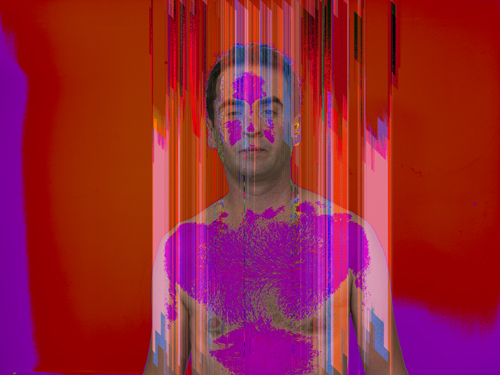
My H3D always worked perfectly but suddenly all images are showing strange colors.

The first second after making the picture the lcd screen shows the image in the correct colors, but after that the colors change.
When I open the image in Lightroom the strange colors are still in the image.

Anybody knows how to deal with this problem?
(I already tried updating the firmware but the problem stays)
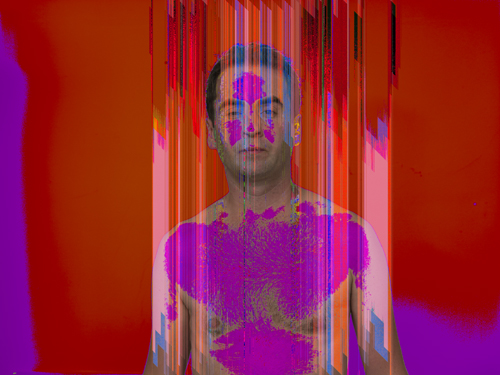
 
Example

Like this...
 

Attachments

  • 29092011-001-Edit.jpg
    29092011-001-Edit.jpg
    181.4 KB · Views: 33
  • 29092011-001-Edit.jpg
    29092011-001-Edit.jpg
    181.4 KB · Views: 33
Hmm... to me this definitely looks like something I would want Hasselblad themselves to look into?

Apparantly your camera records it this way, I mean on the CF card.

So it appears to happen between capture (LCD is OK so the sensor seems to be OK) and writing it on the CF card.
 
Hi Joost,
this is a ACR Problem with Hasselblad Files.
Take Phocus 2.6 and Word is fine ;)

regards
Dieter
 
When I open the file in Phocus the file stays corrupt.
I sent the camera to the dealer today. Probably it has to be sent to Copenhagen indeed.
 
I've had similar experiences with my CFV50 back a couple of times, always with the same (40 mm) lens. I had the lens serviced and the problem seems to have disappeared; according to Wilco there was a problem with the shutter / diafragm combination which cause exposures to be incorrect with strange colors appearing.
I know that at 503 with manual lens and CFV back is a totally differenct combination than what you have, but if everything else fails, have someone have a look at your lens (certainly if this only happens with one and the same lens)?
Just a suggestion.

cheers,
Erik
 
This issue has happened to me a few times, and not just with Hasselblad digital.

The reason that it appears correct at first is you are seeing the preview jpg, but when it processes to full resolution the error occurs.

There are a number of things that can cause this ... chief among them being a power problem ... either a weak or dying grip battery, or one that needs the gauge to be re-set, or a damaged FW cord if shooting tethered. Another can be the CF card used or the CF card reader is corrupting the file.

My first suggestions would be to use a different card and reader, inspect the power issue, then reload the firmware for the camera ... and reload Phocus while you're at it. If multiple lenses do it, then check the gold contact points on the camera itself.

Send it off to Hasselblad if none of the above work. For me, one or the other worked, and I've never had to send the camera in ... but that doesn't mean it isn't something else going on in your case.

Marc
 
I sent the camera to Hasselblad Copenhagen.
They noticed a problem in the DSP-board and fixed it for EUR 1225.

Thanks for your replies!

Regards,
Joost
 
Back
Top